Why the Right Image Format Changes Everything
Every image on your website has a format — JPG, PNG, WebP, AVIF, GIF — and each one handles color, transparency, and compression differently. Using the wrong format means larger files, slower pages, and a weaker experience for your visitors. Using the right one means faster load times, better Core Web Vitals scores, and improved search visibility.
A free online image converter handles this instantly. You select your file, choose the output format, and download a properly converted image in seconds — no software installation, no technical knowledge, and no account required. Whether you're converting a single photo or a full batch of product images, the entire process happens in your browser.
Google's PageSpeed Insights actively flags images in outdated formats as a high-priority performance issue and recommends converting to WebP or AVIF. This tool makes that recommendation easy to act on.
Convert Between Any Format — Instantly
Every common web image format is supported as both input and output. Pick your conversion and go.
Convert JPG to WebP
The most impactful conversion for website performance. WebP images are typically 25–35% smaller than JPG at equivalent visual quality. Google's PageSpeed Insights recommends this conversion for every website optimizing for speed and Core Web Vitals scores.
Convert PNG to WebP
PNG files are lossless but often large. WebP supports both lossy and lossless compression, so converting from PNG gives you a substantially smaller file while preserving full visual quality. For sites with many graphics and interface elements, this reduces total image payload significantly.
Convert Images to AVIF
AVIF delivers the best compression of any mainstream format — 50–65% smaller than JPG and 20–25% smaller than WebP at the same visual quality. It's the optimal format for hero images, product photography, and any image that directly affects Largest Contentful Paint.
Convert JPG to PNG (and Back)
JPG to PNG is useful when you need a lossless source file for further editing or a transparent background. PNG to JPG reduces large lossless files to much smaller sizes for photographs where pixel-perfect accuracy isn't critical — pages load faster with no visible quality difference.
Convert WebP to Other Formats
Not every platform, email client, or design application accepts WebP files. Converting WebP back to PNG or JPG gives you a universally compatible file that works everywhere — essential when submitting to platforms with strict format requirements or editing in software that doesn't support WebP.
Convert GIF Images Online
GIF remains the most universally supported format for simple looping animations. Converting other formats to GIF works for animations that must run in every email client and legacy browser. Converting GIF to WebP typically reduces animated file sizes by 60–70% while preserving the animation.
Convert an Image in Four Steps
No software, no setup, no waiting. From upload to download in under a minute.
Upload Your Image
Drag your file into the upload area or click to browse. JPG, PNG, WebP, AVIF, GIF, and BMP are all accepted as input — no file preparation needed.
Choose Output Format
Select the format you need: WebP and AVIF for web performance, PNG for transparency, JPG for broad compatibility. All options are clearly labeled.
Adjust Quality
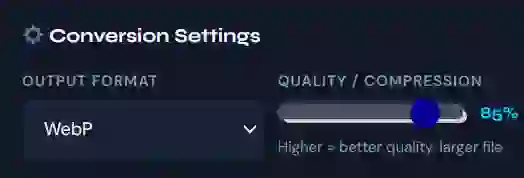
For JPG and WebP output, use the quality slider to balance file size against visual sharpness. A setting of 75–85% delivers strong quality at reduced file weight.
Download Your File
Click convert, then download. The converted file is named and ready to use immediately — no queue, no email confirmation, no account required.
Built for Speed, Privacy, and Simplicity
Every feature is designed to make image conversion fast, private, and completely friction-free.
100% Browser-Based
Conversion runs entirely within your browser using local processing — no server involved. Results are instant and your files never travel anywhere. Speed is consistent regardless of your internet connection quality.
Files Never Leave Your Device
Your images are processed locally and made available for download — no copy is ever sent to a server, stored remotely, or accessible to anyone other than you. Ideal for client images, proprietary product photography, or any visual content that must stay private.
Batch Convert Multiple Images
Select multiple files at once and convert them all to the same output format in a single operation. Processing an entire product catalog, gallery, or set of graphics takes minutes instead of hours when you don't have to handle each file one at a time.
Adjustable Quality Control
The quality slider gives you precise control over the size-to-quality tradeoff for JPG and WebP output. Set maximum quality for hero images where visual precision matters, or reduce it for thumbnails and supporting images where file size takes priority.
Works on Any Device
The fully responsive interface works on smartphones, tablets, and desktops without feature limitations. The upload process integrates with your device's file picker and camera roll — convert images on the go without needing a desktop.
No Limits, Always Free
No daily conversion caps, no maximum file counts, no premium tier required for batch processing. Every feature is available to every user, every time — no registration, no subscription, and no restrictions of any kind.
How Image Format Conversion Improves Your Rankings
Format conversion is one of the most accessible paths to better page performance and stronger search visibility.
Faster Page Load Times
Images account for 50–60% of a typical webpage's total byte weight. Converting from JPG or PNG to WebP or AVIF reduces that weight substantially — pages that previously loaded in 4 seconds may load in 2.5 seconds after format optimization. That improvement compounds across every page of your site and every visitor who loads it.
Up to 65% smaller filesBetter Core Web Vitals
Google uses Core Web Vitals to assess user experience, and these metrics directly influence search rankings. Largest Contentful Paint — which measures how quickly the main content of a page loads — is heavily affected by image size and format. Unoptimized images in outdated formats are among the leading causes of poor LCP scores. Converting to WebP or AVIF reduces image weight, which speeds up LCP and moves your site toward Google's "Good" threshold.
LCP improvement: 20–30%Better Mobile Performance
Mobile users abandon pages that take longer than three seconds to load at a rate of over 50%. Mobile devices frequently operate on slower connections where image file size is even more consequential. Modern formats like WebP and AVIF are specifically designed to deliver high visual quality at small file sizes — making them the practical choice for any site that takes mobile performance seriously.
53% abandonment above 3sOne Converter, Every Image Workflow
From solo bloggers to ecommerce teams — this free image format converter fits how professionals work with images online.
Website Owners
Converting product photos to WebP, preparing hero images in AVIF, and keeping all images in web-ready formats are ongoing tasks for anyone managing a site. A fast, repeatable converter fits naturally into that routine.
Bloggers
Bloggers upload images with every post — featured images, in-content photos, thumbnails. Keeping those images in modern, efficient formats directly affects how fast each post loads and how it performs in search.
SEO Specialists
Image format optimization is a core part of technical SEO. Converting images to WebP and AVIF, improving Core Web Vitals, and actioning PageSpeed recommendations are all part of the same workflow — handled here in seconds.
Ecommerce Store Owners
Product images need to look sharp and load quickly across every device. Batch converting an entire product catalog from JPG to WebP or AVIF in one step — rather than file by file — saves hours and produces consistent output across thousands of images.
Graphic Designers
Designers work with images in multiple formats depending on the tool and the client. Converting design exports to web-ready WebP, or client-supplied PNGs to a specific required format, is a regular need that a browser-based converter handles without software installation.
Developers
Optimizing assets before deployment, converting test images, and preparing files for client handoff are all common developer tasks where a fast, reliable browser-based converter saves time without adding a dependency to the workflow.
Which Image Format Should You Use?
Choose the right format for every use case with this quick reference guide.
| Format | Best For | Compression | Transparency | Recommendation |
|---|---|---|---|---|
| WebP | Photos, graphics, logos, animations | Lossy & lossless | ✓ Yes | Best Choice 2025 |
| AVIF | Hero images, product photos, photo-heavy pages | Best available | ✓ Yes | Maximum Performance |
| JPG | Photographs, wide compatibility fallback | Lossy only | ✗ No | Fallback Format |
| PNG | Logos, icons, screenshots with transparency | Lossless | ✓ Yes | When Transparency Needed |
| GIF | Simple animations, universal compatibility | Limited (256 colors) | ✓ Limited | Animation Only |
Your Images Never Leave Your Browser
Conversion is handled entirely by your device's own processing power. Nothing is transmitted, stored, or shared — by architecture, not just by policy.
Your image files go from your device to your browser's local environment and back to your device. No remote server is involved in the process at any point.
Nothing is stored after your session ends. No database, no logs, no record of which files you converted. Close the tab and the images are gone entirely.
Client photography under NDA, unreleased product images, and any confidential visual content can all be converted here without leaving your controlled environment.
Frequently Asked Questions
Quick answers about the free online image format converter.
Every JPG and PNG Is an Optimization Opportunity
Convert your images to WebP or AVIF in seconds — free, private, and instant. No account, no limits.
This is a title
Type your paragraph here
This is a title
Type your paragraph here


This is a title
Type your paragraph here
This is a title
Type your paragraph here


This is a title
Type your paragraph here
This is a title
Type your paragraph here


This is a title
Type your paragraph here
This is a title
Type your paragraph here